
Download VIA USB 2.0 Host Controller Driver – USB 2.0, driver, Windows 98, compatibility, performance, utility, tool, fix, update, system
Overview
The VIA USB 2.0 Host Controller Driver is a specialized system utility designed to enable USB 2.0 functionality on legacy Windows operating systems, specifically Windows 98, 98SE, and Me. As a critical software component, it facilitates reliable communication between the host controller hardware and connected USB 2.0 devices, ensuring stable data transfer and device recognition. This driver is particularly valuable for users maintaining older systems where USB 2.0 support is not natively available or has degraded over time.
Its primary purpose is to restore or enhance USB performance on outdated platforms, addressing compatibility gaps that may prevent modern peripherals—such as external storage, keyboards, or webcams—from functioning optimally. The target audience includes users of legacy hardware, retro computing enthusiasts, and IT professionals managing older systems in specialized environments. While the developer, VIA Technologies, is known for semiconductor and chipset development, the driver itself is a standalone utility focused on system-level functionality rather than end-user application.
Real-world use cases involve restoring functionality to older machines used for specific tasks like industrial control, embedded systems, or archival work. In the broader app ecosystem, such drivers play a foundational role in maintaining hardware compatibility across generations, even if they are not visible to the average user. The driver’s release in 2003 reflects its historical significance in the transition from USB 1.1 to USB 2.0, though it remains relevant for niche, long-term support scenarios.
Key Features & Functionality
- OS Compatibility with Windows 98/98SE/Me – The driver is explicitly engineered for these legacy systems, ensuring that VIA-based motherboards can leverage USB 2.0 capabilities where they would otherwise be limited to slower USB 1.1 speeds.
- Enhanced Data Transfer Performance – By enabling USB 2.0’s full bandwidth (up to 480 Mbps), the driver improves file transfer times and device responsiveness, particularly for large data transfers involving external hard drives or memory devices.
- Improved Power Management – The driver supports USB 2.0’s advanced power-saving features, allowing connected devices to draw power more efficiently and reducing system load during idle periods.
- Stable, Bug-Fixing Release – This version focuses on resolving known issues present in earlier iterations, improving system stability and reducing the risk of device disconnections or driver crashes.
- Simple Installation Process – Designed for minimal user intervention, the driver can be installed with standard Windows setup procedures, requiring no advanced technical knowledge.
For example, a user with a Windows 98SE machine can install this driver to connect a USB 2.0 external drive and achieve significantly faster backup speeds compared to USB 1.1. Similarly, a technician maintaining a legacy point-of-sale system can use the driver to ensure consistent peripheral recognition across multiple devices.
Interface, UX & Performance
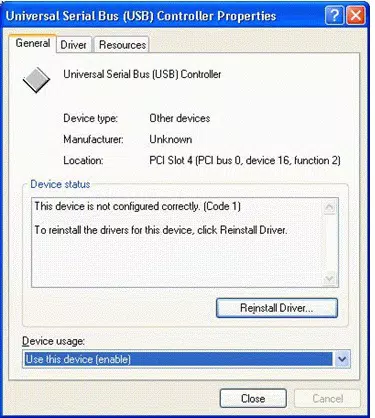
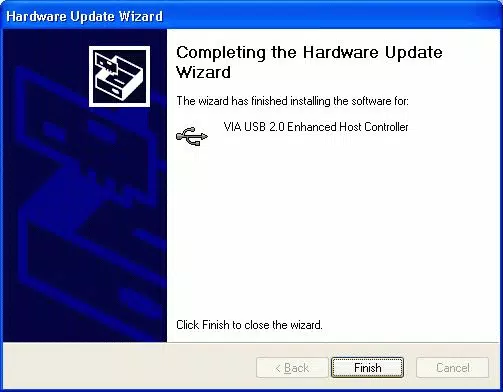
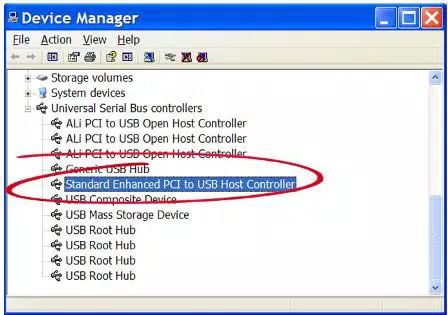
The VIA USB 2.0 Host Controller Driver operates at the system level and does not include a graphical user interface. As a result, user interaction is limited to the standard Windows Device Manager and installation wizards. This design prioritizes functionality over visual engagement, which is appropriate for a low-level system utility.
Navigation is straightforward: users typically install the driver via the provided installer or manually through Device Manager after identifying the USB controller. The absence of a UI means that usability depends heavily on clear documentation and system familiarity. Performance is optimized for the target platforms, with the driver designed to integrate seamlessly into the Windows 98/98SE/Me kernel.
Although the developer did not list formal performance metrics, the driver’s role in enabling USB 2.0 speeds suggests measurable improvements in transfer rates and device responsiveness. Stability is emphasized through the bug-fixing release, which enhances reliability during prolonged use. The driver performs consistently across various hardware configurations based on VIA chipsets, though real-world behavior may vary depending on the underlying system’s condition and additional software conflicts.
Platform Compatibility & Technical Requirements
The driver is designed for the Windows operating system, specifically targeting Windows 98, 98SE, and Me. It is not compatible with later versions such as Windows 2000 or XP, due to licensing restrictions that prevent its distribution for those platforms. Users of newer systems should rely on built-in drivers or manufacturer-provided alternatives.
The software has a file size of 2.1 MB, which is compact and suitable for download on slower internet connections common during the early 2000s. The version number is 1.0, indicating a stable release focused on core functionality rather than feature expansion. Specific hardware requirements were not listed, but the driver is intended for systems equipped with VIA USB 2.0 host controllers.
The developer did not specify minimum OS requirements beyond the supported platforms. Compatibility information was not fully disclosed for peripheral devices or system memory, so users should ensure their hardware is compatible with the targeted operating systems before installation.
Pros and Cons
Pros
- Enables USB 2.0 functionality on legacy Windows 98/98SE/Me systems
- Improves data transfer speeds and device responsiveness
- Stable release with bug fixes for improved reliability
- Simple installation process with minimal user input
- Free to download and use, no licensing fees
Cons
- Not compatible with Windows 2000 or XP due to licensing restrictions
- Limited to older operating systems with declining support
- No graphical interface; requires technical familiarity for troubleshooting
- File size and version are outdated by modern standards
- Developer did not provide detailed system requirements or compatibility list
FAQ
Is the VIA USB 2.0 Host Controller Driver safe to download?
Yes, the driver is provided by VIA Technologies, a reputable semiconductor company. It is free and intended for use on supported legacy systems. Users should ensure they are downloading from official or trusted sources to avoid modified or malicious versions.
Can I use this driver on Windows XP?
No. Due to licensing agreements, the driver is not available for Windows XP or Windows 2000. Users of these systems should obtain drivers from their motherboard manufacturer or use Windows Update.
Do I need this driver if my USB devices are already working?
If your USB devices are functioning normally and you are not experiencing slow transfer speeds or device recognition issues, the driver may not be necessary. However, installing it can ensure you are using the full USB 2.0 specification for optimal performance.
How do I install the driver on my older system?
Download the driver package, run the installer, or manually install it via Device Manager by selecting the VIA USB 2.0 Host Controller and pointing to the driver files. Follow the on-screen prompts to complete the process.
Is this driver still relevant today?
It remains relevant for users maintaining legacy systems where USB 2.0 functionality is essential. While modern systems no longer require it, it serves a niche purpose in preserving older hardware and ensuring continued compatibility with USB 2.0 peripherals.
Final Thoughts
The VIA USB 2.0 Host Controller Driver is a focused, reliable utility that plays a vital role in extending the usability of older Windows systems. Though developed over two decades ago, it continues to serve a specific but important function for users who depend on legacy hardware. Its ability to unlock USB 2.0 performance on Windows 98/98SE/Me platforms makes it a valuable tool for retro computing, industrial applications, and system maintenance.
While the lack of modern interfaces and limited platform support are drawbacks, the driver’s stability, ease of installation, and free availability make it a worthwhile resource for its intended audience. For anyone managing or using older systems with VIA chipsets, this driver is essential for maximizing hardware potential.
Download VIA USB 2.0 Host Controller Driver now


